Нам понадобится:
- Arduino
- Перемычки или Набор проводов для макетирования 65 шт.
- Breadboard
- Резисторы
- Цветной дисплей 1.8 TFT SPI 128x160 + SD
Для реализации проекта нам необходимо установить библиотеки:
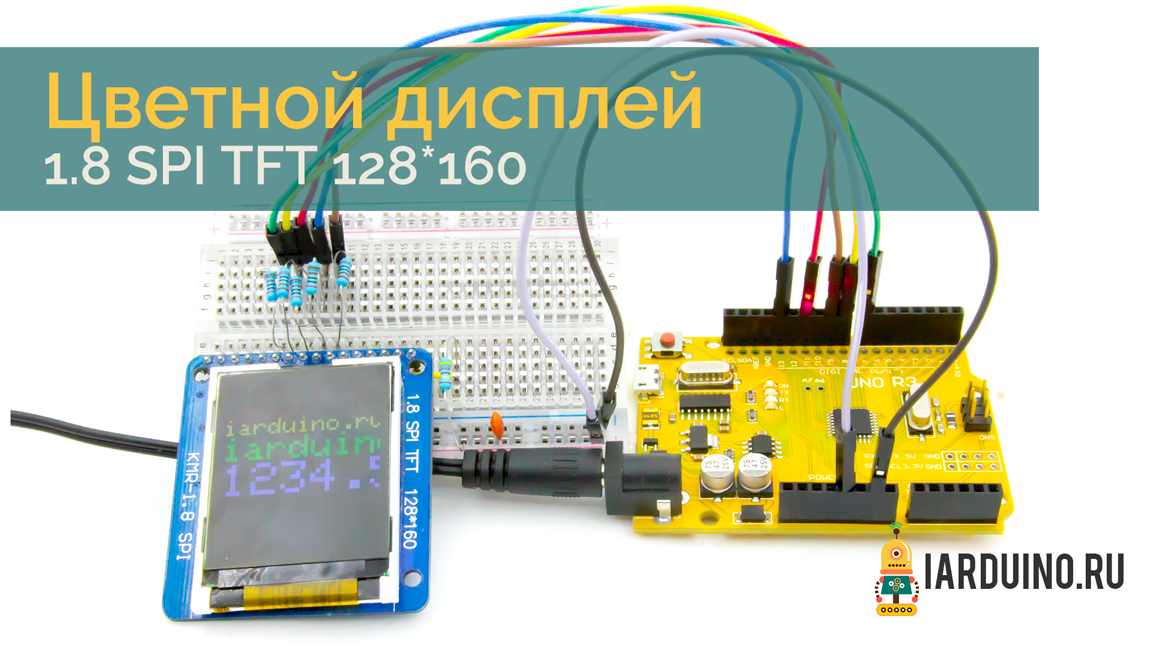
Схема подключения:
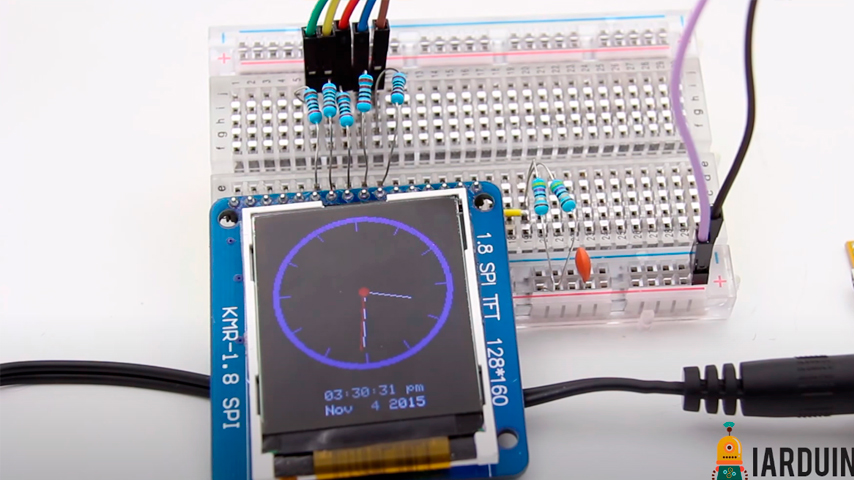
Для подключения дисплея нам понадобятся резисторы:
- R1 номиналом (1кОм -2кОм) - 5 шт.
- R2 номиналом (40Ом -150Ом) - 1 шт.
Мы использовали резисторы на 2кОм и на 47Ом.
| 1.8 TFT SPI 128x160 | Arduino UNO | |
|---|---|---|
| SCL | Pin 13 | Подключаем через резистор R1 |
| SDA | Pin 11 | Подключаем через резистор R1 |
| CS | Pin 9 | Подключаем через резистор R1 |
| A0 (dc) | Pin 8 | Подключаем через резистор R1 |
| RESET | Pin 7 | Подключаем через резистор R1 |
| VCC | +5V | |
| GND | GND | |
| LED+ | +5V | Подключаем через резистор R2 |
| LED- | GND |
Строго используйте резисторы!
Пример скетча:
Не забудьте установить библиотеки указанные в начале урока. Если Вы их установили можно приступить к загрузке скетча в arduino.
#define sclk 13  // Нельзя изменять
#define mosi 11  //  Нельзя изменять
#define cs   9
#define dc   8
#define rst  7  // you can also connect this to the Arduino reset
#include <Adafruit_GFX.h>    // Core graphics library
#include <Adafruit_QDTech.h> // Hardware-specific library
#include <SPI.h>

Adafruit_QDTech tft = Adafruit_QDTech(cs, dc, rst);  // Invoke custom library
float p = 3.1415926;

void setup(void) {
  tft.init();

  uint16_t time = millis();
  tft.setRotation(0);   // 0 - Portrait, 1 - Lanscape
  tft.fillScreen(QDTech_BLACK);
  tft.setTextWrap(true);

  delay(500);

  // large block of text
  tft.fillScreen (QDTech_BLACK);
  tft.fillRect (0, 0, 128, 16, QDTech_GREY);
  tft.fillRect (0, 24, 128, 16 ,QDTech_BLUE);
  testdrawtext ("         111111111222123456789012345678901\nScreen is 21 x 20\ncharacters in size.\n", QDTech_WHITE);

  tft.setCursor (1, 48);
  tft.println ("\"#$%&'()*+,-./0123456789:;<=>?@ABCDEFGHIJKLMNOPQRSTUVWXYZ[\\]^_`abcdefghijklmnopqrstuvwxyz~ right up to ASCII 255\n\nThe quick brown fox  jumped over the lazy dog.\n\n");

  tft.setTextColor(QDTech_RED);
  tft.setCursor (1, 134);
  tft.println ("Countdown:");

  tft.setTextColor (QDTech_BLACK);
  tft.setTextSize (2);
  for (int i=6; i>=0; i--) {
     tft.setCursor (2, 144);
     tft.fillRect (0, 142, 128, 18, QDTech_RED);
     tft.print (i);
     tft.print (" seconds");
     delay(1000);
  }

  tft.setTextSize(1);

  // tft print function!
  tftPrintTest();
  delay(3000);

  // a single pixel
  tft.drawPixel(tft.width()/2, tft.height()/2, QDTech_GREEN);
  delay(500);

  // line draw test
  testlines(QDTech_YELLOW);
  delay(500);

  // optimized lines
  testfastlines(QDTech_RED, QDTech_BLUE);
  delay(500);

  testdrawrects(QDTech_GREEN);
  delay(500);

  testfillrects(QDTech_YELLOW, QDTech_MAGENTA);
  delay(500);

  tft.fillScreen(QDTech_BLACK);
  testfillcircles(10, QDTech_BLUE);
  testdrawcircles(10, QDTech_WHITE);
  delay(500);

  testroundrects();
  delay(500);

  testmultifillcircles(60);
  delay(500);

  testtriangles();
  delay(500);

  mediabuttons();
  delay(500);
}

void loop() {
  tft.invertDisplay(true);
  delay(500);
  tft.invertDisplay(false);
  delay(500);

}

void testlines(uint16_t color) {
  tft.fillScreen(QDTech_BLACK);
  for (int16_t x=0; x < tft.width(); x+=6) {
    tft.drawLine(0, 0, x, tft.height()-1, color);
  }
  for (int16_t y=0; y < tft.height(); y+=6) {
    tft.drawLine(0, 0, tft.width()-1, y, color);
  }

  tft.fillScreen(QDTech_BLACK);
  for (int16_t x=0; x < tft.width(); x+=6) {
    tft.drawLine(tft.width()-1, 0, x, tft.height()-1, color);
  }
  for (int16_t y=0; y < tft.height(); y+=6) {
    tft.drawLine(tft.width()-1, 0, 0, y, color);
  }

  tft.fillScreen(QDTech_BLACK);
  for (int16_t x=0; x < tft.width(); x+=6) {
    tft.drawLine(0, tft.height()-1, x, 0, color);
  }
  for (int16_t y=0; y < tft.height(); y+=6) {
    tft.drawLine(0, tft.height()-1, tft.width()-1, y, color);
  }

  tft.fillScreen(QDTech_BLACK);
  for (int16_t x=0; x < tft.width(); x+=6) {
    tft.drawLine(tft.width()-1, tft.height()-1, x, 0, color);
  }
  for (int16_t y=0; y < tft.height(); y+=6) {
    tft.drawLine(tft.width()-1, tft.height()-1, 0, y, color);
  }
}

void testdrawtext(char *text, uint16_t color) {
  tft.setCursor(0, 0);
  tft.setTextColor(color);
  tft.setTextWrap(true);
  tft.print(text);
}

void testfastlines(uint16_t color1, uint16_t color2) {
  tft.fillScreen(QDTech_BLACK);
  for (int16_t y=0; y < tft.height(); y+=5) {
    tft.drawFastHLine(0, y, tft.width(), color1);
  }
  for (int16_t x=0; x < tft.width(); x+=5) {
    tft.drawFastVLine(x, 0, tft.height(), color2);
  }
}

void testdrawrects(uint16_t color) {
  tft.fillScreen(QDTech_BLACK);
  for (int16_t x=0; x < tft.width(); x+=6) {
    tft.drawRect(tft.width()/2 -x/2, tft.height()/2 -x/2 , x, x, color);
  }
}

void testfillrects(uint16_t color1, uint16_t color2) {
  tft.fillScreen(QDTech_BLACK);
  for (int16_t x=tft.width()-1; x > 6; x-=6) {
    tft.fillRect(tft.width()/2 -x/2, tft.height()/2 -x/2 , x, x, color1);
    tft.drawRect(tft.width()/2 -x/2, tft.height()/2 -x/2 , x, x, color2);
  }
}

void testfillcircles(uint8_t radius, uint16_t color) {
  for (int16_t x=radius; x < tft.width(); x+=radius*2) {
    for (int16_t y=radius; y < tft.height(); y+=radius*2) {
      tft.fillCircle(x, y, radius, color);
    }
  }
}

void testmultifillcircles(uint8_t radius) {
    uint8_t x = tft.width() / 2;
    uint8_t y = tft.height() / 2;
    for (uint8_t i=radius; i>1; i-=1) {
      tft.fillCircle(x, y, i, tft.Color565 (i, 255-(i*2), 0));
    }
}

void testdrawcircles(uint8_t radius, uint16_t color) {
  for (int16_t x=0; x < tft.width()+radius; x+=radius*2) {
    for (int16_t y=0; y < tft.height()+radius; y+=radius*2) {
      tft.drawCircle(x, y, radius, color);
    }
  }
}

void testtriangles() {
  tft.fillScreen(QDTech_BLACK);
  int color = 0xF800;
  int t;
  int w = 63;
  int x = 159;
  int y = 0;
  int z = 127;
  for(t = 0 ; t <= 15; t+=1) {
    tft.drawTriangle(w, y, y, x, z, x, color);
    x-=4;
    y+=4;
    z-=4;
    color+=100;
  }
}

void testroundrects() {
  tft.fillScreen(QDTech_BLACK);
  int color = 100;
  int i;
  int t;
  for(t = 0 ; t <= 4; t+=1) {
    int x = 0;
    int y = 0;
    int w = 127;
    int h = 159;
    for(i = 0 ; i <= 24; i+=1) {
      tft.drawRoundRect(x, y, w, h, 5, color);
      x+=2;
      y+=3;
      w-=4;
      h-=6;
      color+=1100;
    }
    color+=100;
  }
}

void tftPrintTest() {
  tft.setTextWrap(false);
  tft.fillScreen(QDTech_BLACK);
  tft.setCursor(0, 30);
  tft.setTextColor(QDTech_RED);
  tft.setTextSize(1);
  tft.println("iarduino.ru !");
  tft.setTextColor(QDTech_YELLOW);
  tft.setTextSize(2);
  tft.println("iarduino.ru !");
  tft.setTextColor(QDTech_GREEN);
  tft.setTextSize(3);
  tft.println("iarduino.ru !");
  tft.setTextColor(QDTech_BLUE);
  tft.setTextSize(4);
  tft.print(1234.567);
  delay(1500);
  tft.setCursor(0, 0);
  tft.fillScreen(QDTech_BLACK);
  tft.setTextColor(QDTech_WHITE);
  tft.setTextSize(0);
  tft.println("iarduino.ru !");
  tft.setTextSize(1);
  tft.setTextColor(QDTech_GREEN);
  tft.print(p, 6);
  tft.println(" Want pi?");
  tft.println(" ");
  tft.print(8675309, HEX); // print 8,675,309 out in HEX!
  tft.println(" Print HEX!");
  tft.println(" ");
  tft.setTextColor(QDTech_WHITE);
  tft.println("Sketch has been");
  tft.println("running for: ");
  tft.setTextColor(QDTech_MAGENTA);
  tft.print(millis() / 1000);
  tft.setTextColor(QDTech_WHITE);
  tft.print(" seconds.");
}

void mediabuttons() {
  // play
  tft.fillScreen(QDTech_BLACK);
  tft.fillRoundRect(25, 10, 78, 60, 8, QDTech_WHITE);
  tft.fillTriangle(42, 20, 42, 60, 90, 40, QDTech_RED);
  delay(500);
  // pause
  tft.fillRoundRect(25, 90, 78, 60, 8, QDTech_WHITE);
  tft.fillRoundRect(39, 98, 20, 45, 5, QDTech_GREEN);
  tft.fillRoundRect(69, 98, 20, 45, 5, QDTech_GREEN);
  delay(500);
  // play color
  tft.fillTriangle(42, 20, 42, 60, 90, 40, QDTech_BLUE);
  delay(50);
  // pause color
  tft.fillRoundRect(39, 98, 20, 45, 5, QDTech_RED);
  tft.fillRoundRect(69, 98, 20, 45, 5, QDTech_RED);
  // play color
  tft.fillTriangle(42, 20, 42, 60, 90, 40, QDTech_GREEN);
}Комплект для повторения проекта
Что понадобится
Это быстрый ориентир по основным модулям и деталям. Полный список для повторения проекта смотрите в самой статье.
3 позиции Набор перемычек для Breadboard
Комплект из 140 перемычек разной длины для прототипирования схем на макетной плате
Открыть в iArduino
Набор перемычек для Breadboard
Комплект из 140 перемычек разной длины для прототипирования схем на макетной плате
Открыть в iArduino
 Соединительные провода «папа-папа» (65 шт.)
Пучок из 65 проводов «папа-папа» разной длины для прототипирования электронных устройств
Открыть в iArduino
Соединительные провода «папа-папа» (65 шт.)
Пучок из 65 проводов «папа-папа» разной длины для прототипирования электронных устройств
Открыть в iArduino
 Комплект резисторов 30 х 20 шт. 10 Ом - 1 мОм / 600 шт.
30 номиналов по 20 штук
Открыть в iArduino
Комплект резисторов 30 х 20 шт. 10 Ом - 1 мОм / 600 шт.
30 номиналов по 20 штук
Открыть в iArduino